Table of contents
Open Table of contents
Intro
dockerpeek lets you type an image reference like postgres:17-alpine, wait a few seconds, and then browse the image’s filesystem in your browser. You can open folders, read /usr/local/bin/docker-entrypoint.sh, or download any file.
Check out the code: https://github.com/nivekithan/dockerpeek
To show you a file from an image, dockerpeek has to do most of what docker pull does, but on Cloudflare instead of your machine, and without unpacking anything to disk. Here is how that works.
Architecture
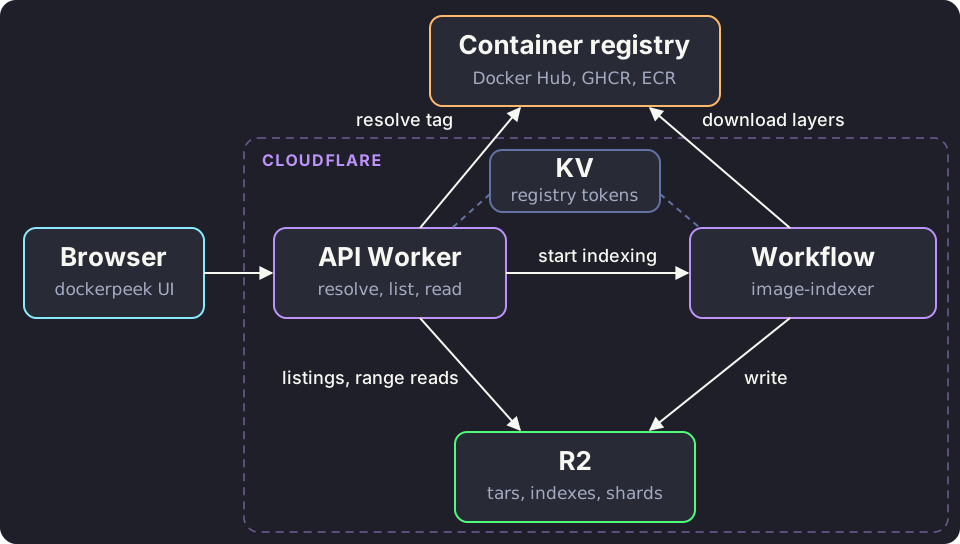
- API Worker: resolves an image reference to a manifest digest, starts indexing, and serves directory listings and file contents.
- Workflow: a Cloudflare Workflow that downloads and indexes the image’s layers. It runs as a series of durable, retryable steps.
- R2: stores everything the indexer produces: layer tars, a file index per layer, and the merged directory listings per image.
- KV: caches registry auth tokens.
Everything is written in TypeScript with Effect.
How registries store images
Before we look into how I built this, we need to know how a registry stores an image and how the Docker CLI downloads it.
A Docker image is stored as a series of layers. Each layer is a tar archive of what changed compared to the layer below it: the files that were added, modified, or deleted. A layer is usually compressed with gzip, and sometimes with zstd.
A manifest is a small JSON document that describes an image: which layers it’s made of, in what order, and where to find its config. It’s the first thing you download when you pull an image. If the image supports multiple platforms, the manifest lists other manifests, one per platform. Otherwise, it lists each layer and its digest.
A digest is the SHA-256 hash of an object’s contents, written like sha256:005c5c37db96.... Registries use digests as addresses: you ask for a manifest or a layer by its digest. The same digest always means the same bytes, and you can check what you downloaded by hashing it yourself.
So to pull an image, we have to download all its layers and apply each one on top of the previous one.
Manifests
All registries follow the same spec, the OCI distribution spec. To get the manifest of postgres:17-alpine, we call:
GET https://registry-1.docker.io/v2/library/postgres/manifests/17-alpine
Accept: application/vnd.oci.image.index.v1+json, application/vnd.oci.image.manifest.v1+json, ...
For most popular images, the first answer is an image index: a list of manifests, one per platform. That’s because the same image is built separately for each platform it runs on, like linux/amd64 and linux/arm64, and each build has different binaries.
{
  "mediaType": "application/vnd.oci.image.index.v1+json",
  "manifests": [
    {
      "mediaType": "application/vnd.oci.image.manifest.v1+json",
      "digest": "sha256:005c5c37db96...",
      "platform": { "architecture": "amd64", "os": "linux" }
    },
    ...
  ]
}
dockerpeek picks linux/amd64 and fetches that manifest by its digest. This is the response we get when we read the manifest of the linux/amd64 platform:
{
  "mediaType": "application/vnd.oci.image.manifest.v1+json",
  "config": {
    "mediaType": "application/vnd.oci.image.config.v1+json",
    "size": 8730
  },
  "layers": [
    {
      "mediaType": "application/vnd.oci.image.layer.v1.tar+gzip",
      "digest": "sha256:...",
      "size": 3853673
    },
    ...
  ]
}
For example, postgres:17-alpine has 10 layers, adding up to 112 MiB.
Authentication
When pulling images from Docker Hub, even public images need a token. So the first request to the registry gets a 401 with a challenge:
HTTP/1.1 401 Unauthorized
www-authenticate: Bearer realm="https://auth.docker.io/token",service="registry.docker.io",scope="repository:library/postgres:pull"
The challenge tells you where to get a token and what to ask for. You call the realm with service and scope as query parameters, get back a JSON body with a token, and retry the original request with Authorization: Bearer <token>. GHCR and public ECR follow the same flow with their own realms, and they hand out anonymous pull tokens for public images.
Docker Hub has a low rate limit for anonymous pulls: 100 pulls per 6 hours per IP address. Cloudflare Workers share their outgoing IP addresses with lots of other Workers, so we hit that limit easily. So I generated a read-only personal access token and use it for Docker Hub requests. Pulls then count against my account instead of a shared IP address.
Streaming layers into R2
Why a Workflow
A layer can be large. The application layer of atlassian/confluence is about 950 MiB compressed. Downloading and indexing that inside one request isn’t realistic, so indexing runs in a Workflow with three kinds of steps:
- list layers: fetch the manifest and return the layer list.
- index layers: index two layers at a time, one step per pair.
- publish file tree: merge the layers into one filesystem and write it to R2.
Streaming layers
A Worker has 128 MB of memory, so a layer can never be held in memory. Instead, each layer goes through one streaming pipeline:
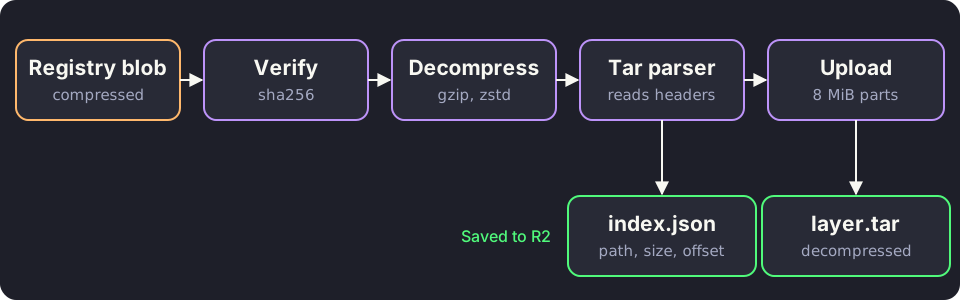
- Decompress: gzip uses the built-in
DecompressionStream. It doesn’t support zstd, so zstd layers go through fzstd. - Parse: a tar is a list of entries, one per file, directory, or link in the layer. Each entry is a small header that describes it (its path, type, permissions, and size), followed by the file’s contents. tar-stream reads each header as the bytes pass through. For every entry we record that metadata, plus the byte offset where the entry’s contents start.
- Upload: the same decompressed bytes go into an R2 multipart upload. R2 requires every part except the last to be the same size and at least 5 MiB, so the bytes are cut into 8 MiB parts, with two uploads in flight at a time.
At the end, each layer has two objects in R2:
layer.tar: the decompressed tar.index.json: every entry in the tar, with its offset.
For example, this is the full index.json of the last layer of node:22-alpine. It’s a tiny layer that only adds Node’s entrypoint script:
[
  { "path": "/usr",
    "type": "directory", "mode": 493, "size": 0, "offset": 512 },
  { "path": "/usr/local",
    "type": "directory", "mode": 493, "size": 0, "offset": 1024 },
  { "path": "/usr/local/bin",
    "type": "directory", "mode": 493, "size": 0, "offset": 1536 },
  { "path": "/usr/local/bin/docker-entrypoint.sh",
    "type": "file", "mode": 493, "size": 388, "offset": 2048 }
]offsetis where the entry’s contents start inlayer.tar. Every entry begins with a 512-byte header, so the first entry’s contents start at byte 512, and the 388 bytes ofdocker-entrypoint.shstart at byte 2048.modeis the Unix permissions as a decimal number: 493 is0755.- Symlinks also get a
linkTarget, like"linkTarget": "/bin/busybox".
Storing the tar decompressed costs more storage, but it lets us read a single file from the middle of the tar with a range request, without decompressing everything before it. A gzip stream can’t be read from the middle.
So to read any file from a layer, all we have to do is:
- Read
index.jsonand find the file’s entry. - Take the file’s offset and size from that entry.
- Read exactly those bytes from
layer.tarwith a range request.
Merging layers
Now that all the layers are stored, we can build the final filesystem by applying each layer on top of the previous one, in manifest order. If two layers contain the same path, you see the version from the later one.
For example, take an image with three layers:
Layer 1 (base OS)       Layer 2 (app)           Layer 3 (update)
/bin/sh                 /app/index.js           /app/index.js
/etc/os-release         /app/config.json        /app/.wh.config.json
/etc/motd                                       /etc/.wh.motd
Merging them gives:
/bin/sh            from layer 1
/etc/os-release    from layer 1
/app/index.js      from layer 3
/app/index.js comes from layer 3, because layer 3 replaced it. But where did /app/config.json and /etc/motd go?
A layer is a tar, and a tar can only add files. So to delete a file, a layer adds a whiteout file next to it:
.wh.<name>deletes<name>from the layers below. In the example,/app/.wh.config.jsondeletes/app/config.json, and/etc/.wh.motddeletes/etc/motd..wh..wh..opqmakes a directory opaque: everything the layers below put in that directory is hidden. If layer 3 had/app/.wh..wh..opqinstead,/appwould contain only what layer 3 adds to it.
Every file in the merged tree remembers which layer it came from and its offset in that layer’s tar. The tree is then saved to R2 as directory listings, and a ready.json marker is written last to show that the Workflow has finished. ready.json lists the image’s layer digests in order:
{
  "layers": [
    "sha256:881fc932939e...",
    "sha256:87aaee1f6667...",
    "sha256:e868d1035e50...",
    "sha256:177fffbd7f51..."
  ]
}
The naive approach is to store each directory listing as its own R2 object, but that causes a huge performance issue.
In my testing, this approach took about 13 minutes to index rocicorp/zero. Almost all of that time went into one step: writing the merged tree to R2. Zero has 3,573 directories, most of them inside node_modules, so writing the tree meant 3,573 R2 writes. That takes a long time, and R2 bills per write too.
The fix was to group the listings into 128 shards. A directory’s shard is the SHA-256 hash of its path modulo 128, so the API can find the right shard for any path without an extra lookup:
const hash = await crypto.subtle.digest(
  "SHA-256",
  new TextEncoder().encode(path)
);
const shard = new Uint8Array(hash)[0] % 128; // shards/<shard>.json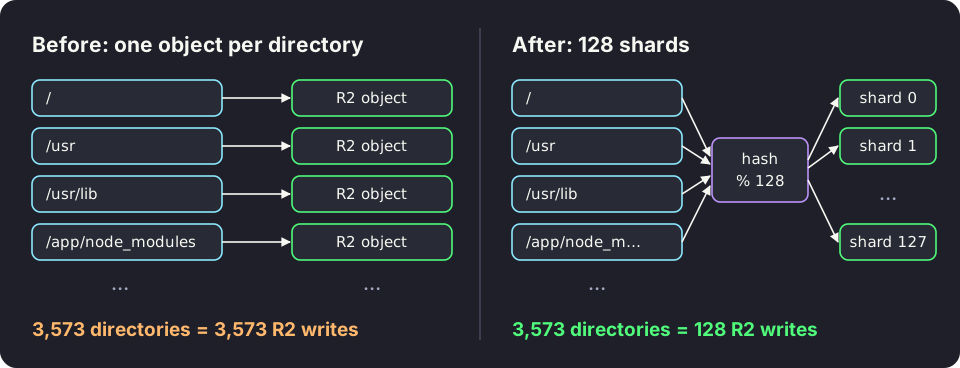
Each shard is a JSON object keyed by directory path. In node:22-alpine, /usr/local/bin hashes to shard 118, so it lives in shards/118.json next to unrelated directories like /etc/periodic (trimmed here):
{
  "/etc/periodic": { "entries": [...] },
  "/usr/local/bin": {
    "entries": [
      { "name": "docker-entrypoint.sh", "type": "file",
        "mode": 493, "size": 388, "layer": 3, "offset": 2048 },
      { "name": "node", "type": "file",
        "mode": 493, "size": 130073000, "layer": 1, "offset": 4133888 },
      { "name": "npm", "type": "symlink", "mode": 511, "size": 0,
        "linkTarget": "../lib/node_modules/npm/bin/npm-cli.js" },
      ...
    ]
  },
  ...
}
Unlike index.json, every file here also has a layer, because a merged directory mixes files from different layers. docker-entrypoint.sh comes from layer 3 and node from layer 1, and ready.json turns those numbers into layer digests.
Now writing the tree takes at most 128 R2 writes, however many directories the image has. After the change, indexing the same Zero image took about 63 seconds on my machine, and writing the tree took under a second.
In the end, this is everything dockerpeek keeps in R2:
| Object | One per | Contains |
|---|---|---|
layers/<layer digest>/layer.tar | layer | the decompressed tar |
layers/<layer digest>/index.json | layer | every entry, with its offset and size |
images/<manifest digest>/shards/<n>.json | image | the merged directory listings |
images/<manifest digest>/ready.json | image | the layer digests, in order |
Layer objects are shared by every image that uses the layer. Image objects belong to one image.
Serving the frontend
With all that in place, the API Worker exposes two main endpoints to the frontend:
GET /images/<digest>/tree?path=...: returns a directory listing.GET /images/<digest>/file?path=...: returns the contents of a file.
Tree: directory listing
You might expect the Worker to hash the requested path, read that shard, and return the listing. That works for most paths, but not when the path goes through a symlink.
For example, in Debian-based images like python:3.12-slim, /lib is a symlink to usr/lib. So /lib/x86_64-linux-gnu is a real directory as far as Linux is concerned, but dockerpeek never stored a listing under that path. The listing lives under the real path, /usr/lib/x86_64-linux-gnu. Hashing /lib/x86_64-linux-gnu finds nothing.
So the Worker resolves the path the way Linux does: one directory at a time, starting from /. For /lib/x86_64-linux-gnu:
read /         →  lib is a symlink to usr/lib,
                  so the path becomes /usr/lib/x86_64-linux-gnu
read /         →  usr is a directory
read /usr      →  lib is a directory
read /usr/lib  →  x86_64-linux-gnu is a directory
return the listing of /usr/lib/x86_64-linux-gnu
Once it reaches the directory, the Worker returns its listing. For /usr/local/bin in node:22-alpine, the response looks like this (trimmed):
{
  "path": "/usr/local/bin",
  "entries": [
    { "name": "docker-entrypoint.sh",
      "type": "file", "mode": 493, "size": 388 },
    { "name": "node",
      "type": "file", "mode": 493, "size": 130073000 },
    { "name": "npm", "type": "symlink", "mode": 511, "size": 0,
      "linkTarget": "../lib/node_modules/npm/bin/npm-cli.js" },
    ...
  ]
}
It’s the same listing that’s stored in the shard, minus layer and offset. Those only matter to the Worker, so the browser never sees them.
Reading a file
To open a file, the API Worker finds its entry in the directory listing. The entry says which layer tar the file is in, where its data starts, and how big it is. The Worker then reads exactly those bytes from R2 with a range request and streams them to the browser.
For example, opening /usr/local/bin/docker-entrypoint.sh in node:22-alpine works like this:
- The Worker walks the path the same way as the tree endpoint, and finds
docker-entrypoint.shin the/usr/local/binlisting inshards/118.json, withlayer: 3,offset: 2048, andsize: 388. - Layers count from 0, so in
ready.json, layer 3 is the fourth digest:sha256:177fffbd7f51.... - Read bytes 2048 to 2435 of
layers/sha256:177fffbd7f51.../layer.tar, and stream them to the browser.
An image’s shards and ready.json never change once they’re written, so the Worker caches them. The tree and file responses are cached too, so browsing a popular image rarely touches R2 at all.
If you want to see what’s inside an image without pulling it locally, try it at dockerpeek.nivekithan.com.